Thursday, 5 September 2013

FINALLY GOOGLE FACES

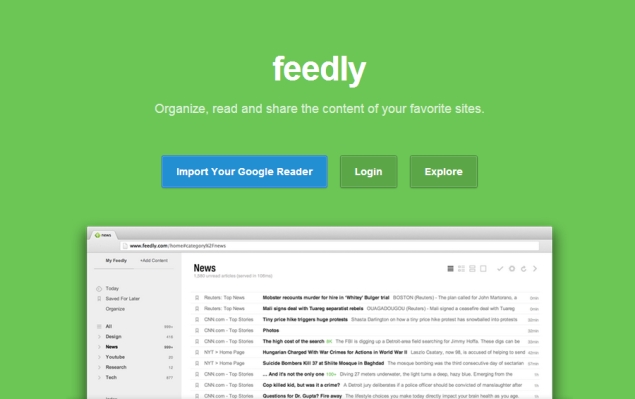
Is Feedly a worthy replacement of Google Reader?
feedly_635.jpg
On July 1, we say goodbye to Google Reader, a handy tool for bringing headlines and articles from your favorite websites into a single place.
With Reader, I've been able to see at a glance all the updates from various news services, blogs and company websites I follow. Although many of these items relate to work, I have added a few fun topics, too, including news on Antarctica and a daily dose of passive aggressive notes that people send each other.
I have spent a lot of time curating Reader, so I'm not keen on seeing it die.
Fortunately, there's an afterlife. Google has made it easy to move your list of sites you follow, known as feeds, to another service. And many of those rival services have made it easy to accept those feeds, especially after Google said in March that it would retire Reader.
Reader's demise comes as little surprise. Google says usage has declined since Reader made its debut in 2005.
RSS feeds - for really simple syndication - used to be a popular way to keep track of multiple websites without having to visit each and every one. Content comes to you, through readers such as Google Reader. More recently, though, Twitter and Facebook have performed a similar role in discovering content. I myself have logged on to Reader less frequently because keeping up with more than 150 feeds from dozens of sites became overwhelming.
Yet I still check it now and then for a glimpse of what's out there.
As July 1 approached, I looked at a half-dozen alternative services. All of them are free, like Reader. It didn't take long to find one that exceeds what Reader offers in many ways, though a few omissions will leave me missing Google's offering.
The service that stands out is Feedly. An update available Wednesday allows Feedly to run on just about any major Web browser. The service also is available through apps on the iPhone, the iPad and Android devices.
Transferring your feeds from Reader is easy.
Most other services require you to create a data file of those feeds using a Google tool called Takeout. It's fairly straightforward, but you then have to save the file to your computer and import that to the service. In one case, only one of the more than 150 feeds survived the transfer because of some glitch.
With Feedly, you can skip that step. Simply log in with your Google account, and all that gets done automatically. There's also no need to create and remember a separate Feedly account. You use your Google credentials each time you're back.
On Reader, I have my feeds organized by category into folders. Those categories remain intact on Feedly, though they appear alphabetical rather than topical, as I had arranged them on Reader. It isn't too difficult to reorder them.
Feedly excels in highlighting the most popular items from all your feeds, based on sharing and other interactions on Feedly and elsewhere. Simply visit a page called "Today." Under the default layout, you see headlines and the first sentence or two of each item. You can click on any item for more.
You can also share the item on a number of social networking sites. That freedom isn't available on Reader, which confines sharing to Google's own Plus service.
My four main complaints with Feedly
1. You can save a link to read later, but it would have been better had Feedly fetched those items as well so you can read them offline.
2. Although the service lets you email items to others, you have to go through stand-alone software such as Outlook, which is often tied to your work account. By contrast, Reader lets you email over the Web using Google's own Gmail service.
3. With Reader, items are automatically marked as read as I scroll down, so that they won't reappear the next time. Feedly does that, too, in a non-default layout that most resembles Reader's. That part is good. But while Feedly offers additional layout options, it doesn't take full advantage of its greater breadth. It would have been nice to have auto-marking when scrolling in those layouts as well.
4. Many websites let you easily add their feeds by clicking on a button. Reader is usually among the options, but Feedly isn't yet. Instead, you must copy and paste the Web address for the feed into Feedly. But Feedly is better than Reader at suggesting feeds to add, if you don't have specific ones in mind for a given topic.
I did try one other service that makes it as easy as Feedly to transfer feeds from Reader and discover new ones. But that service, called Pulse, does require you to set up a separate Pulse account or use Facebook's - not Google's. If you can get past that added hassle, Pulse does the rest of the work for you once you log in to your Google account. There's no Google data file to create, save and import.
Unfortunately, articles are presented as tiles, similar to what you see in Microsoft's oft-criticized Windows 8 operating system. That works fine when you're choosing apps on a tablet computer. On desktop and laptop computers, I find a list much easier to read and scroll through. I had a backlog of more than 20,000 articles, and I wasn't about to click on 20,000 squares.
There are dozens of other services I didn't get a chance to try. Some of them are more geared toward mobile devices. Others are still in development. For example, a popular site called Digg promises one on June 26, just five days before Reader's cutoff.
I'm sure there's one out there that matches or exceeds what Feedly offers, but I saw no need to look further.
Feedly has tripled its user base to 12 million since Google announced Reader's retirement. The growth has given Feedly incentive to work on new features. Feedly has also designed the system so that outside developers can build apps for it. You can use one to run Feedly on BlackBerry phones, for instance.
Feedly isn't perfect, but switching to it will make Reader's demise easier to accept.

HARD GAMMING

Nvidia Tegra Tab 7 Android tablet's high-resolution images surface online

tegra-tab7-leak-big.jpg
A number of rumours have hit the Internet over the past few months pointing to Nvidia's supposed plans to launch a 7-inch tablet based on Android. More recently, new leaks and sightings have put a face to the name.
This time a bunch of high-resolution images of the Nvidia Tegra Tab 7 have emerged, showing the overall design of the tablet and also revealing that the alleged tablet from Nvidia will come with a stylus.
The source of the latest leak is a Chinese site, ChinaDIY, which has posted a number of images of the alleged tablet.
The images reveal that the front panel of the tablet will be dominated by its 7-inch display while it also features dual-front speakers and supposedly no front camera. The images also reveal that the rear of the device will come with Tegra Note branding in the middle and will have a textured design. Leaked images also show a rear camera and the various ports that are located on the sides of the tablet. The micro-HDMI port and a microSD card slot are also visible on the sides. However, the leak doesn't say anything about the internals of the device.
The tablet is rumoured to come with a 7-inch HD display with a resolution of 1280x768 pixels, and Nvidia's 1.8GHz quad-core Tegra 4 processor. It is said to sport a 5-megapixel rear camera. The tablet is expected to run Android 4.2.2 Jelly Bean. Other features include a Micro-HDMI port, USB port, audio output jack, Bluetooth, Wi-Fi and even a SIM Tray that hints that the tablet may come with 3G or 4G support.
Earlier, a report claimed that the Chipset maker may launch the alleged Tegra Tab 7 at the IFA in Berlin which just kicked off on Wednesday.
Previously, the tablet has also been spotted in AnTuTu benchmark results.

ASUS HOPES BEST

ASUS MeMO Pad 8 and MeMO Pad 10 tablets launched

asus-memo-pad10-big.jpg
Asus has added two new MeMO Pad tablets in its portfolio, the MeMO Pad 8 and MeMO Pad 10.
The Asus MeMO Pad 8 comes with 8-inch IPS display with 1280x800 pixels resolution. It is powered by a 1.6GHz quad-core processor along with 1GB of RAM. It sports a 5-megapixel rear camera that can record 720p videos and a 1.2-megapixel front-facing camera. The tablet measures around 127mm from side to side and weighs 350g. The Asus MeMO Pad 8 comes with 8GB of internal storage and supports a microSDXC card slot for expansion. Asus claims up to nine hours of HD video playback on a single charge .
On the other hand, the Asus MeMO Pad 10 comes with 10-inch IPS display with 1280x800 pixels resolution. The tablet weighs 522 grams. The MeMO Pad 10 sports a 2-megapixel rear camera which can record HD videos and also includes a 1.2-megapixel front camera for video chat. It is powered by a 1.6GHz quad-core processor along with 1GB of RAM. The Asus MeMO Pad 10 can deliver up to 9.5 hours of battery life with HD video playback. The tablet comes in two storage variants - 8GB and 16GB with support for a microSDXC card slot.
Both the tablets feature dual speakers with Asus SonicMaster audio technology. However, Asus has not revealed the details about pricing of the tablets or when they'll be available in the market.

IFA 2013 Berlin - In pictures

Asus MeMO Pad 8 key specifications
  • 8-inch IPS display with 1280x800 pixels resolution
  • 1.6GHz quad-core processor
  • 1GB of RAM
  • 5-megapixel rear camera
  • 1.2-megapixel front-facing camera
  • 350gram
  • 8GB of internal storage
  • 9 hours of battery life with HD video playback
Asus MeMO Pad 10 key specifications
  • 10-inch IPS display with 1280x800 pixels resolution
  • 1.6GHz quad-core processor
  • 1GB of RAM
  • 2-megapixel rear camera
  • 1.2-megapixel front-facing camera
  • 522 grams
  • 8GB and 16GB of internal storage
  • 9.5 hours of battery life with HD video playback
For the latest technology news and reviews, like 

WALKMAN walking back

Sony Walkman F886 portable music player with Android 4.1 launched

sony-f886-portable-music-player-big.jpg
Sony's flagship smartphone, the Xperia Z1 may have been the star of its IFA event but the company also subtly launched a Walkman F886 portable music player.
The Sony Walkman F886 portable music player features a 4-inch TRILUMINOS LCD display and supports 192KHz/ 24bit high-resolution audio formats which the company claims can deliver around six times more audio quality than music recorded on a standard CD. It comes with S-Master HX digital amplifier that can reduce distortion and noise at all frequency ranges.
It also includes Sony's Digital Sound Enhancement Engine (DSEE) technology for restoring high-range sound that is lost in the compression process and upscale compressed audio data to a quality higher than that of CDs, claims the company.
The Sony Walkman F886 portable music player runs the Android 4.1 Jelly Bean OS with access to Google Play Store apps and the device is compatible with Windows and Mac operating systems. Connectivity options on the portable music player include Wi-Fi, Bluetooth and NFC.
The newly launched Walkman F886 includes 32GB of internal storage which is non-expandable. The company claims that the device can deliver up to 35 hours of MP3 playback or 26 hours of high-resolution audio.
The company has not revealed any pricing details for the Sony Walkman F886 portable music player but has announced that the device can be expected to hit markets in October.
Sony launched its flagship smartphone, Xperia Z1 and the attachable smartphone lens cameras, Sony Cyber-shot DSC-QX100 and DSC-QX10 at its IFA event on Wednesday.

IFA 2013 Berlin - In pictures

Sony Walkman F886 portable music player key specifications
  • 4-inch TRILUMINOS LCD display
  • Supports 192KHz/ 24bit high-resolution audio formats
  • Android 4.1 Jelly Bean with access to Google Play Store
  • S-Master HX digital amplifier
  • ClearAudio+
  • Comes with DSEE (Digital Sound Enhancement Engine)
  • Digital Sound Enhancement Engine (DSEE) technology
  • 32GB of internal storage
  • Can deliver up to 35 hours of MP3 playback or 26 hours of high-resolution audio
  • Wi-Fi, Bluetooth, NFC
  • Compatible with Windows OS and Mac OS
  • Digital Noise cancelling
For the latest technology new

YAHOO GOES PURPLE AGAIN........................!

Yahoo unveils new logo after 30-day countdown
july, September 05, 2013

yahoo-brand-new-logo-635.jpg
Yahoo has adopted a new logo for the first time since shortly after the Internet company's founding 18 years ago.
The redesigned look unveiled late Wednesday is part of a makeover that Yahoo Inc. has been undergoing since the Sunnyvale, California, company hired Google executive Marissa Mayer to become Yahoo's CEO 14 months ago.
Mayer has already spruced up Yahoo's front page, email and Flickr photo-sharing service, as well as engineered a series of acquisitions aimed at attracting more traffic on mobile devices.
The shopping spree has been highlighted by Yahoo's $1.1 billion purchase of Tumblr, an Internet blogging service where the company rolled out its new logo.
The purple logo spells out the word Yahoo!, with no letters touching and ending with an exclamation point.
"We wanted a logo that stayed true to our roots (whimsical, purple, with an exclamation point) yet embraced the evolution of our products," a statement on the website said.
In an effort to drum up more interest in the changeover, Yahoo spent the past 30 days showing some of the proposed logos that Mayer and other executives cast aside.
The revision is the first time that Yahoo has made a significant change to its logo since a few tweaks shortly after co-founders Jerry Yang and David Filo incorporated the company in 1995.
Mayer's overhaul of Yahoo has attracted a lot of attention, but so far it hasn't provided a significant lift to the company's revenue. Yahoo depends on Internet advertising to make most of its money, an area where the company's growth has been anemic while more marketing dollars flow to rivals such as Google Inc. and Facebook Inc.
Yahoo's stock has climbed by nearly 80 percent, but most of that gain has been driven by the company's 24 percent stake in China's Alibaba Holdings Group. Investors prize Alibaba because it has emerged as one of the fastest growing companies on the Internet.
For the latest technology news and reviews, like us on Facebook or follow 

WAY OUT FOR NOTE 3

Samsung Galaxy Note 3: First impression
       govind, September 05, 2013

samsung-galaxy-note-3-screen-635.jpg
Samsung is giving its latest Galaxy Note smartphone a stylish makeover.
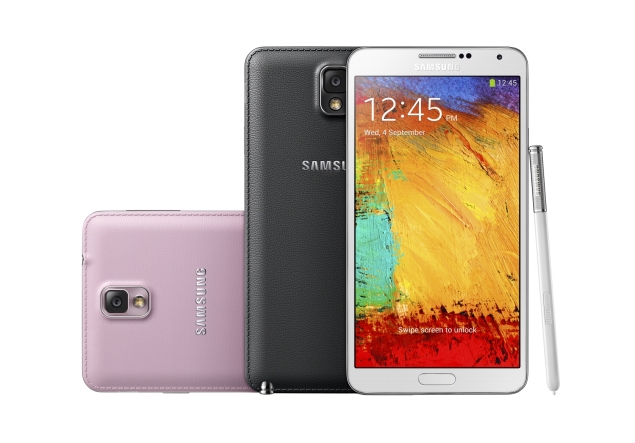
The Galaxy Note 3, unveiled Wednesday, has a soft, leather-like back. It feels like you're holding a fancy leather-bound journal. Grooves on the side of the big-screen phone make it easier to grip.
But I found the new phone to be complicated to use. There's too much going on. Between Scrapbook, My Magazine, Air Command and dozens of other functions, it might take even the most experienced smartphone user several hours to figure out.
I tested out the Note 3 for about 45 minutes Wednesday at a Samsung press event in a New York hotel. The company also unveiled its next tablet, the Galaxy Note 10.1, which is basically an extra-large version of the Galaxy phone, but without the cellular service. The phone and its pen were both tied down to a table with a security device, so I was hampered testing it out. A colleague spent several minutes with the tablet and was likewise hampered.
But I saw enough of the Note 3 to at least like its look and feel.
With its leather-like back and the stitching around it, the phone feels expensive and well made in my hands. The soft back can be snapped off the phone to reveal the battery. Samsung will sell replaceable back covers in several different colors, but the phone itself will come in just three: black, white or pink.
galaxy-note-3-different-colours-635.jpg
The Note 3 has a bigger screen than its predecessor, measuring 5.7 inches (14.5 centimeters) diagonally compared with the Note 2's 5.5 inches (14 centimeters). But it still weighs less (5.9 ounces (167 grams), compared with 6.4 ounces (182 grams)) and is slightly thinner (at 0.33 inch (8.4 millimeter) rather than 0.37 inch (9.4 millimeter)).
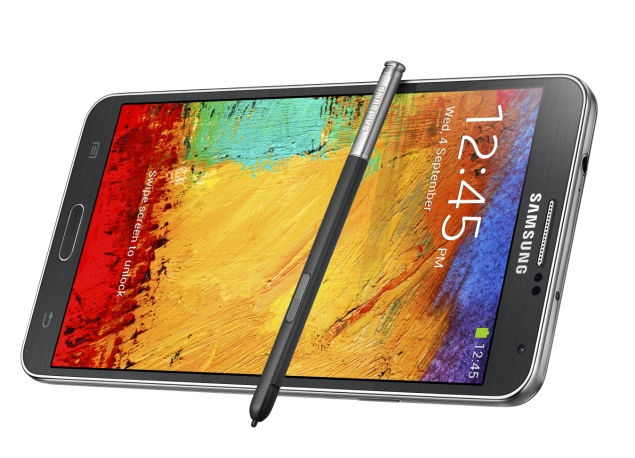
The biggest changes are with the S Pen. The pen unlocks a new feature called Air Command. With that, you can open five other features:
  • With Action Memo, you can handwrite a note.
  • Scrapbook lets you circle content you like, such as a YouTube video or a news article. It automatically saves and organizes the content into a format that's easy to scroll through. Scrapbook, with its boxy format, looks a lot like social media site Pinterest.
  • Screen Write captures a screen and allows you to write comments on that captured image.
  • S Finder is the phone's search engine, to find chat messages, documents or other content on the phone.
  • Pen Window, the most promising of the five, lets you access one of eight apps by drawing a box of any size on the screen. Let's say you're on a Web page and need to calculate something. You can open Air Command, then Pen Window. Draw a box on the screen, and eight icons pop up. You then click the one for the calculator. Pen Window currently opens a limited number of applications: calculator, clock, YouTube, phone, contacts, a Web browser and two separate chat apps - Samsung's ChatON and Google's Hangouts. (Two different ones? Did I mention the phone's complicated to use?) It's possible Pen Window will support additional apps later.
I couldn't figure out how to open Air Command on my own. During a presentation beamed into the New York hotel's TV sets from Berlin, where Samsung unveiled the device, a company executive said pointing the pen to the screen was all it took to open Air Command. That wasn't the case. A Samsung representative in New York showed me how to use it. I learned that I had to click the S Pen's button while hovering over the screen to get to Air Command.
Another new feature, My Magazine, was also hard to find. My Magazine was developed in partnership with Flipboard, an app that pulls content from news sources and your social media accounts and presents it in an easy-to-read magazine format. My Magazine does the same thing. It is customizable, pulling news content from various news sources based on subjects you want to follow, such as business or food related articles. You can also sync it with your Twitter, Facebook, Instagram, Tumblr and other social media accounts. My Magazine is well designed and is a place where you can easily catch up with all your social media accounts and news in one place.
But first I had to find it. A representative had to show me that an upward swipe at the bottom of the screen opens it up.
The redesigned S Pen is tough to use. It is small and thin, making it hard to grip. Not surprisingly, the button on the stylus was quite small, too. You end up spinning the pen around every time you need to click it. The phone and tablet is very geared toward the pen, rather than pinching and swiping with your fingers as with other phones such as Apple Inc.'s iPhone and even Samsung's flagship Galaxy S4.
I had no problem converting my handwritten phone numbers into digital contacts on the phone. But my colleague, who admits she has messy handwriting, says the tablet had trouble reading it.
The phone's screen is crisp and very clear. I watched several YouTube videos and a preview for "Iron Man 3." The bigger screen makes watching video a joy, and I can see myself watching movies on it instead of a tablet. The new phone's screen resolution is far better on the Note 3 - at 386 pixels per inch rather than 264 on the Note 2. (By comparison, the iPhone 5 is at 326 pixels per inch.)
The phone's 13 megapixel camera took clear shots, but it was slower than I'm used to on my iPhone 4S, the model from 2011. A processing alert pops up for a second while a photo is saving.
The Galaxy Note 10.1 tablet, also unveiled Wednesday, has the same features of the Note 3 phone, just with a bigger, 10-inch (26-centimeter) screen. Like the phone, it has the leather-like backing and grooves on the side.
The tablet has a few extra bells and whistles. One of the big perks is the tablet's file organization system, which is similar to that of a traditional personal computer. It lets you create folders and sub-folders for documents, providing easy access. Also like a PC, the tablet lets you create up to eight profiles, so you can let your kids, spouse or guests use the tablet without fear that they will read your email, delete your photos or access apps you don't want them to.
The tablet also comes with a host of freebies that the phone doesn't have, including free trial subscriptions to The New York Times, Bloomberg Businessweek and other news sources, along with extra space with online storage service Dropbox.
The tablet's display is bright and clear, good for watching TV or viewing photos. It also has stereo speakers and cameras on both its front and back sides.
Samsung said the phone and tablet will ship worldwide in most countries on Sept. 25, but it will come later in the U.S. Samsung didn't say when, other than some time before the holidays. The company also didn't say how much the devices will cost.
I'm eligible for a new phone upgrade on my Verizon Wireless contract. I was waiting to see if Apple Inc. will launch a new phone this month. But after testing out the Note 3, I'm considering both. I need more time with the Note 3, though, to figure it all out.

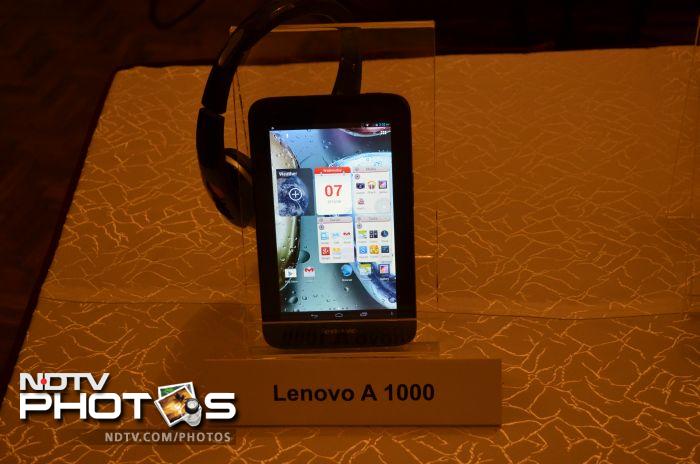
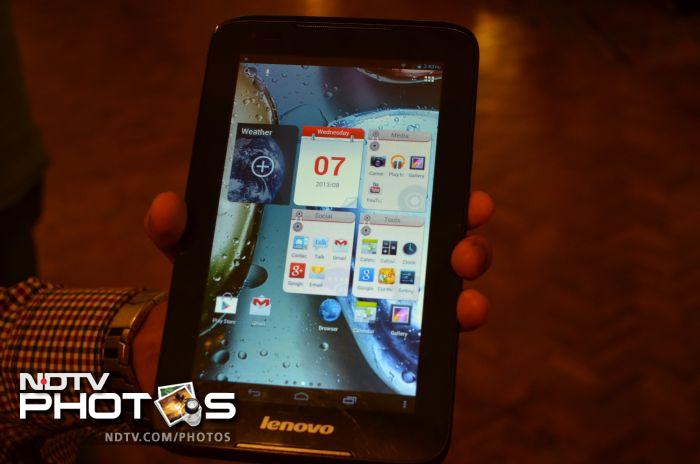
LENOVO 7 inch toy latest images


The Lenovo A1000 sports a 7.0-inch display.

SAMSUNG GOES BIG

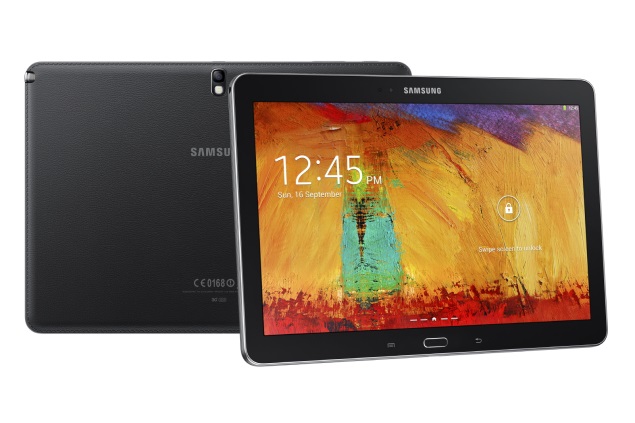
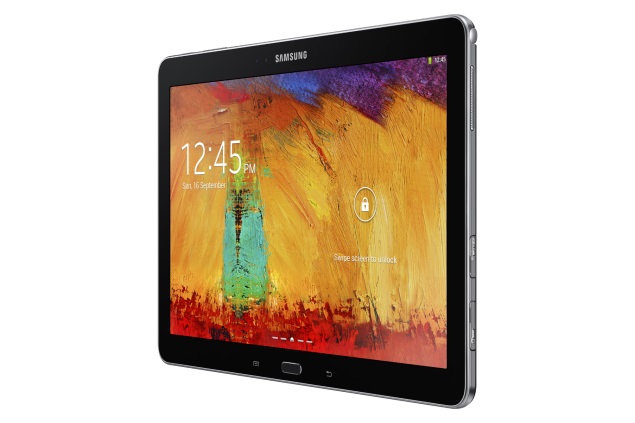
Samsung Galaxy Note 10.1 2014 Edition unveiled

samsung-galaxy-10.1-big.jpg
Samsung has unveiled the latest member of the Galaxy Note tablet family in the form of Galaxy Note 10.1 2014 Edition.
The Samsung Galaxy Note 10.1 2014 Edition features a 10.1-inch WQXGA (2560X1600) Super clear LCD display. Just like the Samsung Galaxy Note 3, it comes in two variants. The 3G + Wi-Fi variant is powered by a 1.9GHz octa-core processor, while the Wi-Fi + LTE variant is powered by a 2.3GHz quad-core processor. There is 3GB of RAM and the tablet comes with 16GB/ 32GB/ 64GB internal storage options. It sports an 8-megapixel rear camera with BSI sensor and autofocus accompanied by an LED flash, as well as a 2-megapixel BSI sensor. It run Android 4.3 Jelly Bean.
The tablet, like its predecessors, comes with S-Pen stylus. A number of new features like Action Memo, Scrapbook, Screen Write and S Finder have been introduced on the new flagship Galaxy Note 3, will also been seen on the Galaxy Tab 10.1 2014 Edition. The device houses a large 8220mAh battery. The newly launched Galaxy Note 10.1 also comes pre-loaded with Samsung KNOX for enhanced security. Connectivity options on the tablet include Wi-Fi, Bluetooth, Wi-Fi Direct and AllShareCast, as well as 3G/ LTE as indicated earlier.
The company has announced that the Galaxy Note 10.1 (2014 Edition) tablet will come in three connectivity options: Wi-Fi only, Wi-Fi and 3G, Wi-Fi and LTE. It will come in two colour options Jet Black and Classic White.
galaxy_010_Black-big.jpg
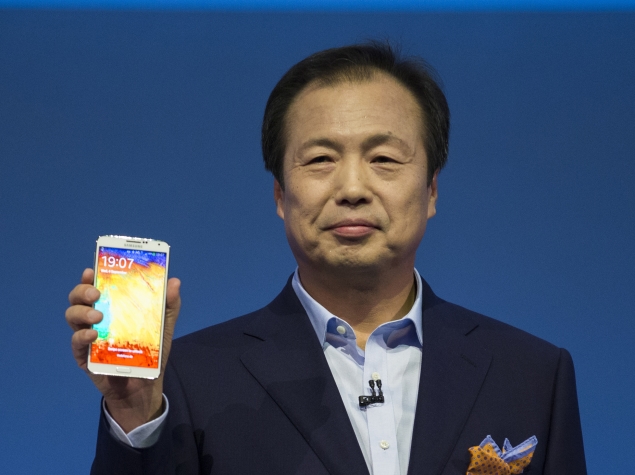
Commenting on the launch JK Shin, CEO and President of IT & Mobile Division at Samsung Electronics said, "The new Galaxy Note 10.1 is the most progressive 10-inch tablet, delivering the best viewing and multitasking experiences. It is the most recent demonstration of Samsung Mobile's focus on constant product innovation to stay aligned with shifting consumer interests. The Galaxy Note 10.1 (2014 Edition) unites a range of features that will consistently surprise consumers as they realise how much easier and more enjoyable it makes their everyday lives."
The tablet will be available starting Q3 2013. There's no word yet on pricing.

IFA 2013 Berlin - In pictures

Samsung Galaxy Note 10.1 2014 Edition key specifications
  • 10.1 features a 10.1-inch WQXGA (2560X1600) Super clear LCD display
  • 1.9GHz octa-core processor (3G/ Wi-Fi version) and a 2.3GHz quad-core processor (LTE version)
  • 3GB of RAM
  • 8-megapixel rear camera with LED flash
  • 2-megapixel front-facing camera
  • 8220mAh battery
  • 16GB/ 32GB/ 64GB internal storage
  • Android 4.3 Jelly Bean
  • S-Pen stylus

YELLOW ADS

YELLOW

Tuesday, 3 September 2013

3 comming up

'Expendables 3' Photo: Harrison Ford and Arnold Schwarzenegger buddy up on the set

Schwarzenegger shares a behind-the-scenes look on Twitter
(CBR) Bruce Willis won’t be back for The Expendables 3. Instead, we’ll get Harrison Ford in his place — a worthy trade-up by Sylvester Stallone’s own estimation.
In case the idea of Ford appearing in an Expendables movie is too much for your brain to process without a visual, today’s your lucky day: Arnold Schwarzenegger tweeted a photo of himself posing with Ford and director Patrick Hughes on the Expendables 3 set, proving the erstwhile Indiana Jones star is very much a part of the action-packed threequel.
Exactly what Ford’s role involves remains unknown, but now we know he shares some screen time with Schwarzenegger — or, at the very least, their production schedules overlapped. Based on the flight suit he’s wearing in the picture, however, perhaps Ford’s character brings some much-needed flight power to the Expendables crew.
Featuring returning players like Stallone and Jason Statham, as well as franchise newcomers Mel Gibson and Wesley Snipes, The Expendables 3 lands in theaters on Aug. 15, 2014.
A photo of Arnold Schwarzenegger, Patrick Hughes and Harrison Ford on the set of The Expendables 3
Copyright © 2013 Comic Book Resources. Reprinted with permission. All rights reserved.

Read more at http://www.hitfix.com/news/expendables-3-photo-harrison-ford-and-arnold-schwarzenegger-buddy-up-on-the-set#4q32YPC0Y4pzVjez.99 

CANT WAIT

  • Out of the Furnace
    2013 Film
  • Out of the Furnace is an upcoming American thriller film, directed by Scott Cooper, from a screenplay written by Cooper and Brad Ingelsby. Wikipedia